
Objective
This SOP outlines how to manage data collection, usage, deletion, consent, and sharing in Google Analytics 4. It ensures compliance with privacy regulations, protects user data, and enables ethical, accurate measurement through tools like Consent Mode, data modeling, and granular settings.
Overview
This SOP covers:
- Core data usage and privacy controls in GA4
- How to schedule and manage data deletions
- Implementing Consent Mode and adjusting data collection
- Managing ads personalization and data sharing
- Using behavioral and key event modeling
- Business applications for privacy-first measurement
Step 1: Navigate to Data Controls in GA4
To begin:
- Go to Admin in your GA4 property
- Under Data Collection and Modification, select Data Deletion Requests
Ensure you have the Editor role to access and adjust data controls.
Step 2: Use the Data Deletion Tool
This tool allows you to delete specific data from Analytics servers. For example, remove PII accidentally sent via URL parameters.
- Go to Admin -> Select Data Deletion Requests
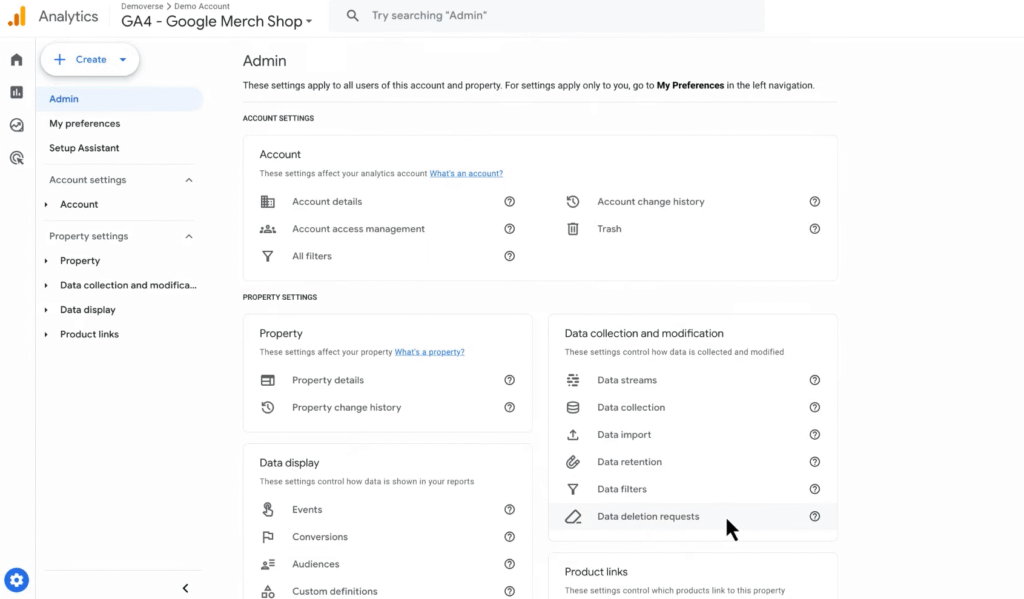
- Click Schedule data deletion request
- Select: Delete selected registered parameters on selected events
- Set the start and end dates
- Choose the custom event and parameter(s)
- Click Schedule request → Confirm
Editor users are notified and have 7 days to cancel. Deletion takes 7–63 days, but affected data is excluded from reports immediately.
Step 3: Implement Consent Mode
Consent Mode adjusts how tags behave based on the user’s consent choices. You can use your own consent banner or a Consent Management Platform (CMP).
Key behaviors:
- When analytics_storage=’granted’: Tags behave normally
- When analytics_storage=’denied’: GA4 sends cookieless pings, no cookies are set
These pings allow Google to use modeling to estimate behavior and key events.
Step 4: Manage Ads Personalization Controls
Control how data is used for ad targeting at multiple levels:
Property Level
Disable ads personalization for the entire GA4 property
Country or State Level
Customise ads personalization by region
Event or User Property Level
Mark specific events (e.g. purchase) or user properties as non-personalized
Session Level
Disable personalization until explicit consent is granted
Step 5: Adjust Collection Settings for Privacy Compliance
Navigate to Admin → Property Settings to manage:
- Google Signals: Enable/disable per region
- Granular location/device data: Toggle by country
- Data retention: Set the auto-deletion period for user- and event-level data
- IP Addresses: Automatically anonymized (GA4 doesn’t log IPs)
Step 6: Remove Data When Needed
Use the following methods to remove data:
Request Data Deletion
Submit deletion requests (7-day grace period)
Delete Individual User Data
- Use Explore > User Exploration
- Delete user ID data within 72 hours
Delete a Property
Properties moved to trash are deleted after 35 days
User Deletion API
Remove data for multiple users in bulk
Step 7: Share Analytics Data Responsibly
To manage data sharing:
- Go to Admin → Account → Account Details
- Adjust Data Sharing Settings, including:
- Google products & services
- Benchmarking and business insights
- Technical support access
- Recommendations for your business
Step 8: Understand and Use Modeling in GA4
To fill gaps in your data caused by denied consent or missing identifiers, GA4 applies:
Behavioral Modeling
- Estimates user and session data for those who declined cookies
- Based on observable patterns from consenting users
Key Event Modeling
- Predicts missing conversions (e.g., purchases)
- Attributed using observed event trends and AI predictions
You’ll see a data quality icon when modeled data is being used in reports.
Step 9: Choose and Apply a Consent Framework
To properly communicate consent to Google:
- Implement Google Consent Mode or
- Use IAB Europe’s TCF framework
Each method enables accurate tag behavior and compliance with privacy laws. CMPs can automate this, or custom setups can manually send consent states to Google tags.
Step 10: Avoid Sending PII to GA4
Google prohibits sending personally identifiable information (PII). Examples include:
- Emails
- Phone numbers
- Social Security Numbers
Review all parameters being sent (via events, URLs, or form fields) to avoid violating Google’s policies.