
Objective
To guide users in using standard GA4 reports, particularly Acquisition and Engagement, to answer key business questions, monitor traffic sources, evaluate campaign effectiveness, and identify optimisation opportunities.
Overview
This SOP will help you:
- Understand foundational GA4 metrics (users, sessions, events)
- Use acquisition reports to analyse traffic and campaigns
- Use engagement reports to evaluate user behaviour
- Apply comparison periods, secondary dimensions, and key events
- Extract insights that support data-driven decision-making
Step 1: Understand GA4’s Core Metrics
| Metric | Definition |
| User | An individual who interacts with your site or app |
| Session | A group of interactions from a user within a single visit |
| Event | A specific interaction (e.g., click, view, purchase, sign-up) |
Think of these like a library visit:
- User = the library patron
- Session = each visit to the library
- Event = each action taken (browsing books, checking out, etc.)
Step 2: Use Acquisition Reports to Analyse Traffic Sources
Access the Acquisition Overview Report:
- Navigate to Reports → Acquisition → Overview
- Review metrics such as:
- Users and Sessions
- Traffic by default channel group
- Top sources and mediums
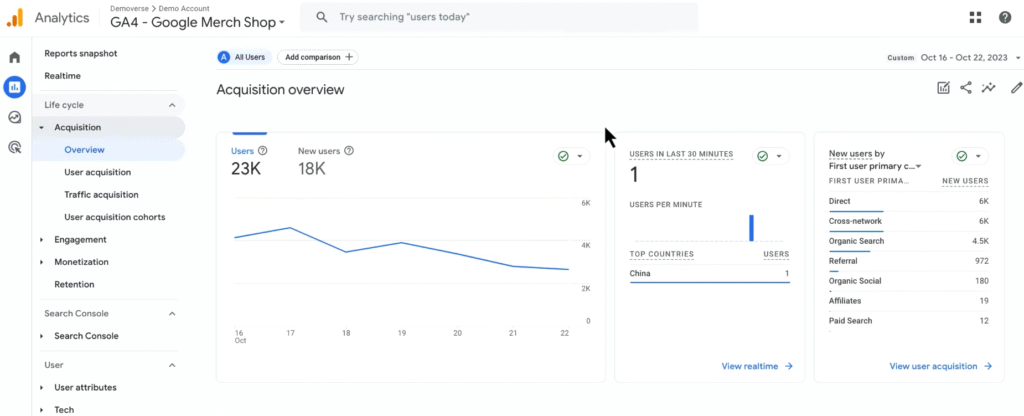
Compare Date Ranges:
- Use the date selector at the top right
- Example: Compare Oct. 16–22 to Oct. 9–15
You’ll quickly spot trends — such as a 70% increase in cross-network (display ad) traffic.
Step 3: Investigate Campaign Performance
Deep Dive via Traffic Acquisition Report:
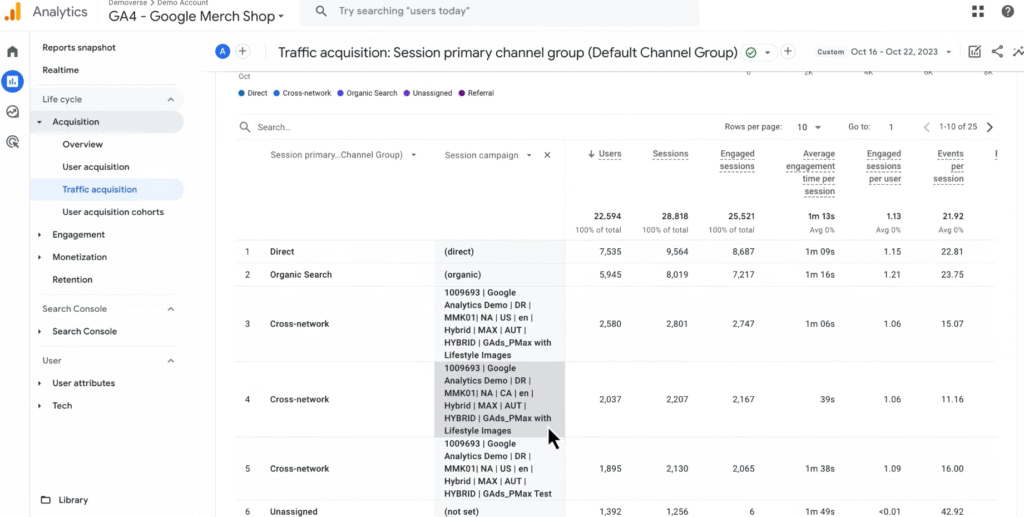
- Navigate to Reports → Acquisition → Traffic Acquisition
- Remove any active date comparisons
- Add Session Campaign as a secondary dimension
You’ll now see which campaigns are responsible for traffic spikes (e.g., US, Canada, US without lifestyle images).
Compare Campaign Engagement:
- Review columns like Average engagement time and Events per session
- Identify campaigns with lower engagement (e.g., Canada campaign)
This may indicate irrelevant landing pages or weak audience targeting.
Review Key Events Performance:
- Scroll to the Key events column
- Use the dropdown to filter by specific key events (e.g., purchase)
A campaign showing significantly fewer key events (e.g., 1 vs 5–8) likely underperforms.
Step 4: Optimise Based on Report Findings
Use these insights to take action:
| Insight | Optimisation Tip |
| Low engagement or conversions | Rework ad creatives or landing page experience |
| One campaign outperforms another | Reallocate ad budget accordingly |
| Unclear audience targeting | Refine campaign audiences based on engagement data |
Always tie metrics back to business goals (e.g., sign-ups, purchases).
Step 5: Use Engagement Reports to Evaluate Content
Navigate to Reports → Engagement → Overview to see:
- Total engagement metrics
- Most visited pages/screens
- Interactions and conversions over time
Use Engagement Reports To Answer:
- Which pages drive the most traffic or conversions?
- Did engagement improve after a website update?
- Are users interacting with your key features?
Step 6: Tie It All Together — Example Workflow
Business Question: Why did cross-network traffic increase last week?
Your Workflow:
- Compare Date Ranges in Acquisition Overview
- Isolate Campaigns using secondary dimension in Traffic Acquisition
- Compare Engagement metrics across campaigns
- Check Conversions using Key Events
- Make Optimisation Decisions (e.g., budget reallocation)
This type of workflow helps you proactively manage campaigns based on real data.
Key Reports and the Questions They Answer
| Report | Business Questions Answered |
| Acquisition Overview | Where is my traffic coming from? Is it growing or shrinking over time? |
| User Acquisition | How are new users finding my website or app? Are my marketing efforts reaching fresh audiences? |
| Traffic Acquisition | Which campaigns or channels drive the most sessions and conversions? |
| Engagement Overview | Which content or screens retain users? Where are users spending time? |
| Pages and Screens | Which pages or screens get the most traffic and interaction? |